Bufa
Bufa app icon

Everything you copy, one keystroke away

Bufa keeps your clipboard history on your Mac and brings back recent copies with ⌃⌥1–9. It also turns copies and screenshots into one clean prompt for Claude, ChatGPT or Codex.

Coming soon to the Mac App Store
Free to start · macOS 15 Sequoia or later
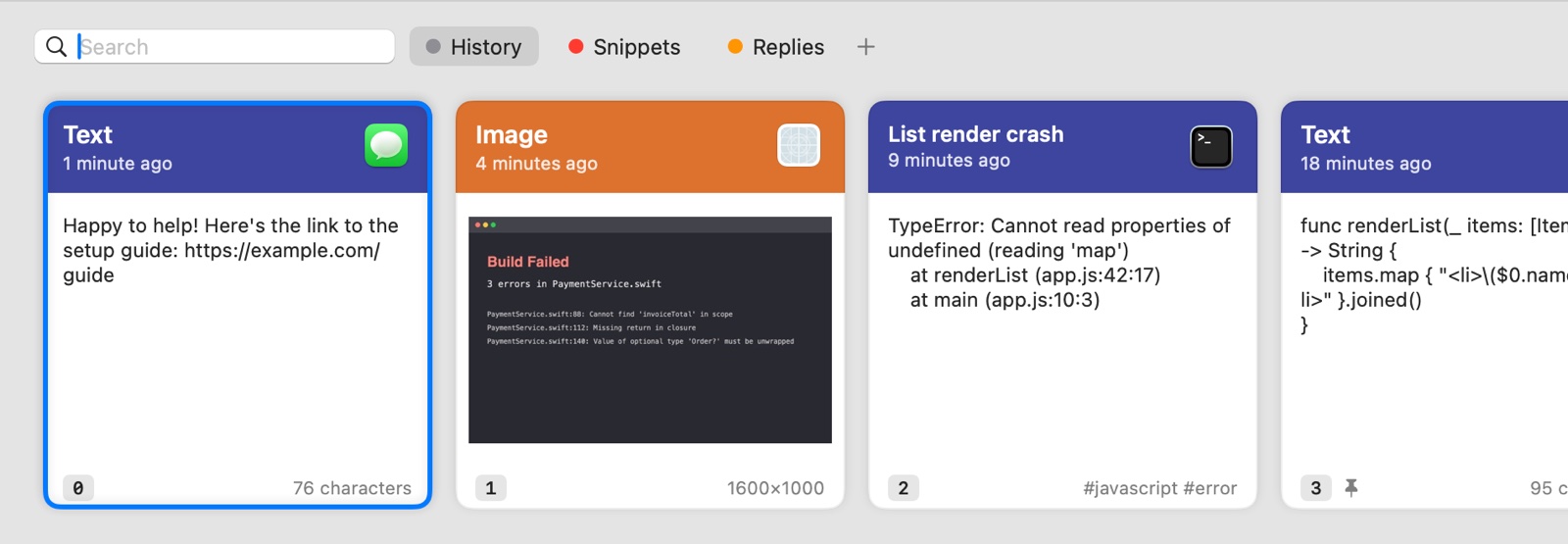
Bufa's panel at the bottom of the screen: recent copies as cards, with numbers, previews and the apps they came from
⌘Vpastes your latest copy, as always
⌃⌥1 … ⌃⌥9put an older copy back, then ⌘V
⌃⌥Vshows everything you copied, with search
⌘Pturns the copies you chose into a prompt

Prompts

Many copies, one prompt

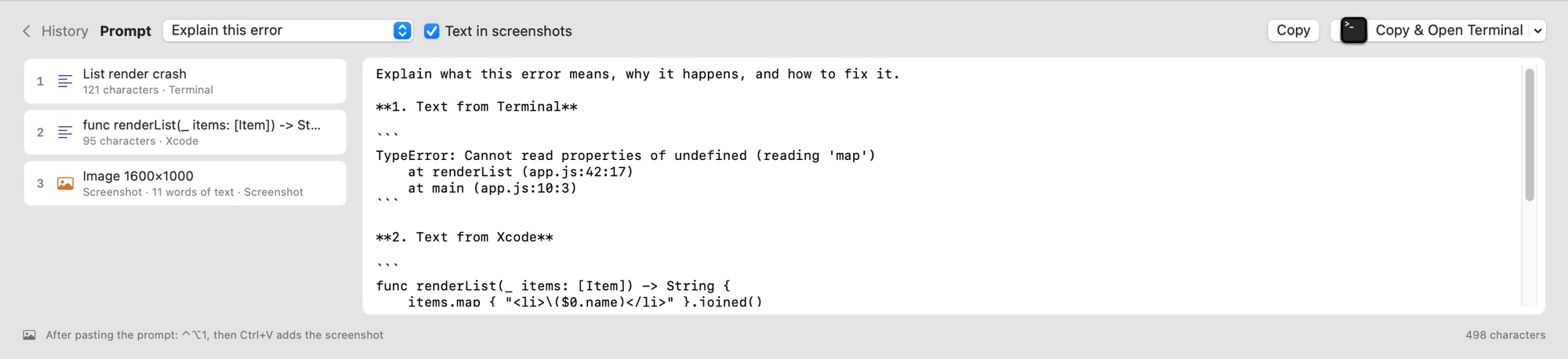
An error from the terminal, the function that throws it, a screenshot of what went wrong. Choose them in Bufa, pick a template and get one clean prompt.

  • Templates: Explain this error, Review this code, Find the cause and fix it, Summarize, or your own
  • Bufa opens Claude, ChatGPT, Codex, your terminal or the website; you press ⌘V
  • Screenshots wait right behind the prompt: ⌃⌥1, then ⌘V
  • Passwords and keys stay out unless you put them in
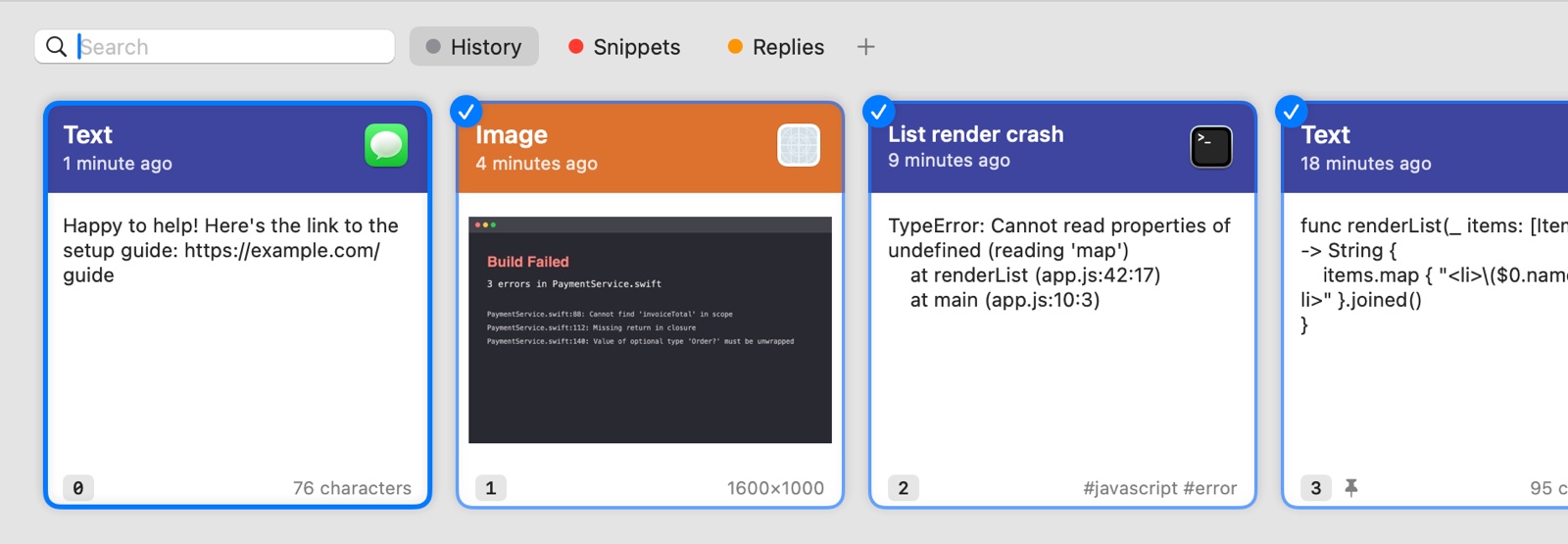
Three cards chosen for a prompt, each with a checkmark: a screenshot, an error and some code
The prompt composer: three chosen items on the left, the finished prompt on the right, and a button to copy it and open Terminal

Find and keep

Find it again, even inside screenshots

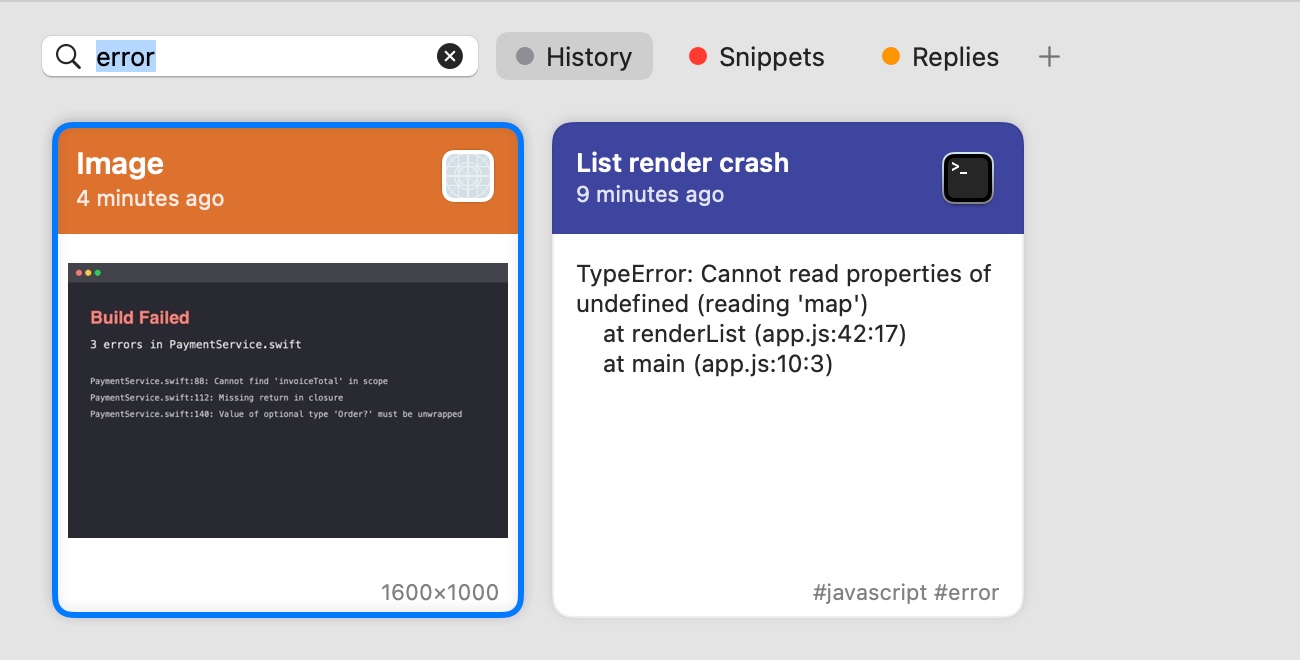
Type to search all your copies. Bufa reads the text in your screenshots on your Mac, so “error” finds the screenshot of a failed build.

  • Text, links, images, files and screenshots, with their formatting
  • Filter by type or by the app you copied from
  • Pinboards keep snippets, replies and links you reuse
  • Shortcuts actions: get a recent copy, or make a prompt for any AI action
Search results for 'error': a screenshot of a failed build, found by its text, and a JavaScript error

Pricing

Start free. Pay a little for more.

Free
$0

For as long as you like

  • Your last 5 copies
  • ⌃⌥1–4 and the panel
  • Search
Bufa
$0.99 / month

Your whole history

  • Unlimited history
  • ⌃⌥1–9
  • Pinboards
  • Search inside screenshots

U.S. prices; the App Store shows the price in your country. Subscriptions renew monthly until you cancel in your App Store account settings, at least 24 hours before the end of the period. No trial: Free is the trial.

Privacy

Your clipboard stays on your Mac

No network access

The app can't connect to the internet at all. History, search and on-device AI all run on your Mac.

No account, no tracking

No sign-up, no analytics, no ads. The App Store label says “Data Not Collected”, and it's true.

Secrets handled with care

Copies that password managers mark as hidden are never recorded. Keys and tokens are masked and removed after 24 hours.

Read the privacy policy

Questions

Does Bufa paste for me?

No, you press ⌘V yourself. Apps in the Mac App Store can't type into other apps, and Bufa doesn't ask for Accessibility access. ⌃⌥1–9 put a copy on the clipboard; ⌘V puts it where you are.

Which AI apps does it work with?

Any app you can paste into. Bufa can open Claude, ChatGPT (with Codex), Terminal, iTerm, Ghostty and Warp for Claude Code or Codex CLI, or claude.ai and chatgpt.com in your browser.

Does Bufa send my copies to an AI service?

Never. Bufa only puts the prompt on your clipboard and opens the app you chose. What you paste there is up to you. The optional on-device AI uses Apple's model on your Mac.

What happens if I stop paying?

Nothing is deleted. Bufa shows your newest 5 copies again, and everything older comes back when you subscribe again. You can also delete it in Settings → Plan.

What do I need?

A Mac with macOS 15 Sequoia or later. On-device AI needs macOS 26 and a Mac with Apple Intelligence turned on; everything else works without it.

More answers on the support page.